TRIM / 01
Old turns wait behind “show more.”
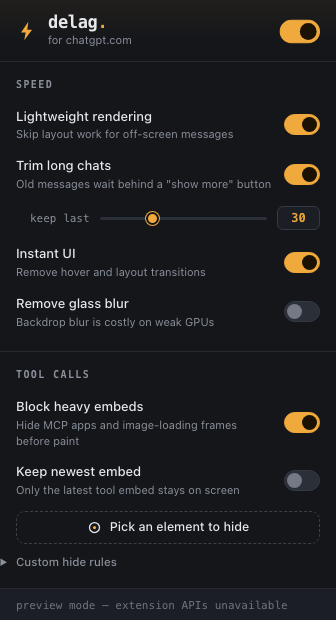
Choose how many recent turns stay visible, then reveal older batches or the entire thread at any time.
 gpt delagger.
Chrome extension · Manifest V3
GPT Delagger hides older ChatGPT turns and heavy tool UI from layout and paint—without deleting messages or taking React-owned nodes out of the page.
Chrome Web Store: listing prepared, not published yet
Measured, not marketed
The included offline fixture has 141 turns. With default settings, GPT Delagger hides 111 older turns plus tool UI, so 693 of 835 thread elements leave layout and paint while staying in the DOM.
This is a controlled rendering-work measurement, not an FPS, latency, memory, or performance guarantee. React still owns and reconciles every node.
TRIM / 01
Choose how many recent turns stay visible, then reveal older batches or the entire thread at any time.
BLOCK / 02
Hide known MCP apps, connector cards, run-status UI, failure fallbacks, and image-generation loading frames.
ZAP / 03
Point at a stubborn element, widen or narrow the selection, and save a conservative custom hide rule.
LIGHT / 04
Use content visibility, remove transitions, and optionally disable backdrop blur on weaker GPUs.
Privacy boundary
The extension inspects ChatGPT’s page structure locally to decide which interface elements to hide. It does not record, retain, transmit, sell, or share conversation content.
Read the full privacy policy →Manual fallback
The Chrome Web Store route is not live yet. Today’s install uses Developer mode and is best suited to people comfortable loading unpacked extensions.
Get the latest release ZIP and its SHA-256 file.
Unzip it into a permanent folder; Chrome loads that folder directly.
Visit chrome://extensions or edge://extensions.
Enable Developer mode, choose Load unpacked, and select the extracted folder.